Architecture as Code
Living documentation that evolves with your systems. These diagrams are generated from code, version-controlled, and automatically updated.
Why Architecture as Code?
✓ Always Up to Date
Diagrams live in the codebase and update with every change. No more outdated PowerPoints.
✓ Version Controlled
Track architecture evolution over time. See what changed, when, and why.
✓ Review & Collaborate
Architecture changes go through pull requests just like code. Team visibility built-in.
✓ Automated Publishing
Diagrams render automatically in CI/CD. Documentation deploys with every release.
C4 Model: 4 Levels of Architecture Diagrams
Progressive zoom from system context down to code level. Each level can be automatically generated from your infrastructure and application code.
Level 1: System Context
SystemBig picture: your system, users, and external dependencies
Web App → Payment API
Web App → Email Service
Parse deployment pipelines and infrastructure configs to extract external systems
Parse .github/workflows/cd.yml to extract Cloudflare Pages, deployment triggers, and external services
Level 2: Container
ContainerApplications, databases, microservices, file systems
Node.js API
Redis Cache
PostgreSQL DB
Parse Infrastructure as Code to extract resources and dependencies
inframap generate terraform/ generates PlantUML from Terraform state, or parse package.json dependencies
Level 3: Component
ComponentServices, controllers, repositories within a container
OrderController
PaymentGateway
DatabaseRepository
Scan source code directory structure and module organization
Recursively scan src/services/, src/components/ directories
and parse index.ts exports
Level 4: Code
CodeClasses, methods, functions, interfaces
getUser(id)
updateUser(id, data)
deleteUser(id)
}
Use AST parsers to extract class structures, method signatures, and dependencies
Use acorn or @babel/parser to parse TypeScript files and extract class methods, or use typedoc for full API docs
💡 This Portfolio: All 4 C4 levels are auto-generated from code using
npm run docs:arch
Level 1 System Context Example
High-level view of this portfolio site and its external dependencies, auto-generated from GitHub Actions workflows.
graph TB
User[Visitor]
Site[ChrisLyons.dev<br/>Portfolio Site]
CF[Cloudflare Pages<br/>Hosting + CDN]
GH[GitHub<br/>Source & CI/CD]
LH[Lighthouse CI<br/>Performance Testing]
GP[GitHub Pages<br/>Documentation]
User -->|Views| Site
Site -->|Deployed to| CF
GH -->|Builds & Deploys| CF
GH -->|Runs tests| LH
GH -->|Publishes docs| GP
LH -->|Uploads reports| CF
style Site fill:#2563eb,color:#fff
style User fill:#7c3aed,color:#fff
style CF fill:#f97316,color:#fff
style GH fill:#059669,color:#fff .github/workflows/cd.yml and ci.yml Level 2 Container Example: Microservices Architecture
Event-driven microservices with Kafka showing containers (services, databases, message queues) and their interactions.
graph TB
subgraph "Client Layer"
Client[Client App<br/>Web/Mobile/Desktop]
end
subgraph "Identity Provider"
Okta[Okta OIDC<br/>Access Tokens]
end
subgraph "API Gateway"
Gateway[API Gateway<br/>Node.js<br/>Token Validation]
end
subgraph "Microservices"
User[User Service<br/>Node.js<br/>Token Validation]
Order[Order Service<br/>Python<br/>Token Validation]
Payment[Payment Service<br/>Java<br/>Token Validation]
end
subgraph "Event Bus"
Kafka[Kafka Cluster]
end
subgraph "Data Layer"
UserDB[(User DB<br/>MongoDB)]
OrderDB[(Order DB<br/>PostgreSQL)]
PaymentDB[(Payment DB<br/>PostgreSQL)]
end
Client --> Okta
Okta -.Access Token.-> Client
Client --> Gateway
Gateway --> User
Gateway --> Order
Gateway --> Payment
Gateway -.Validate Token.-> Okta
User -.Validate Token.-> Okta
Order -.Validate Token.-> Okta
Payment -.Validate Token.-> Okta
User --> Kafka
Order --> Kafka
Payment --> Kafka
User --> UserDB
Order --> OrderDB
Payment --> PaymentDB
style Kafka fill:#7C3AED,color:#fff
style Gateway fill:#2563EB,color:#fff
style Okta fill:#007DC1,color:#fff
docs/architecture/examples/microservices.mmd Level 2 Container Example: Data Pipeline Architecture
Real-time and batch data processing containers showing data flow from ingestion through transformation to consumption.
graph LR
subgraph "Data Sources"
API[External APIs]
DB[Legacy DB]
Stream[Event Stream]
end
subgraph "Ingestion Layer"
Glue[AWS Glue<br/>ETL Jobs]
Lambda[Lambda<br/>Real-time]
end
subgraph "Storage"
S3[S3 Data Lake]
end
subgraph "Processing"
Spark[Spark Jobs<br/>Batch Transform]
Stream2[Stream Processor<br/>Real-time]
end
subgraph "Data Warehouse"
Snowflake[(Snowflake<br/>Analytics)]
end
subgraph "Consumption"
BI[BI Dashboards]
API2[Data APIs]
ML[ML Models]
end
API --> Glue
DB --> Glue
Stream --> Lambda
Glue --> S3
Lambda --> S3
S3 --> Spark
S3 --> Stream2
Spark --> Snowflake
Stream2 --> Snowflake
Snowflake --> BI
Snowflake --> API2
Snowflake --> ML
style S3 fill:#FF9900,color:#000
style Snowflake fill:#29B5E8,color:#fff
style Spark fill:#E25A1C,color:#fff
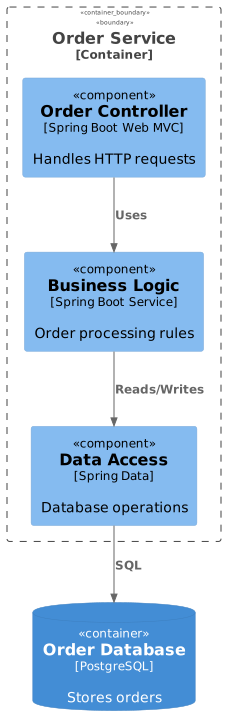
docs/architecture/examples/data-pipeline.mmd Level 3 Component Example: Order Service
Zooming into the Order Service container to show its internal components, controllers, and repositories.
View PlantUML Source Code
@startuml
!include https://raw.githubusercontent.com/plantuml-stdlib/C4-PlantUML/master/C4_Component.puml
Container_Boundary(api, "Order Service") {
Component(controller, "Order Controller", "Spring Boot Web MVC", "Handles HTTP requests")
Component(service, "Business Logic", "Spring Boot Service", "Order processing rules")
Component(repo, "Data Access", "Spring Data", "Database operations")
}
ContainerDb(db, "Order Database", "PostgreSQL", "Stores orders")
Rel(controller, service, "Uses")
Rel(service, repo, "Reads/Writes")
Rel(repo, db, "SQL")
@enduml
docs/architecture/examples/order-service.puml Level 4 Code Example: ThemeManager Class
Zooming into a component to show class structure and method signatures, auto-generated from TypeScript source code. Note: Level 4 diagrams are optional. They're great for critical algorithms, security components, or complex business logic that needs detailed documentation. But avoid generating them for entire systems—they quickly become overwhelming and unmaintainable at scale.
classDiagram
class ThemeManager {
-storage: ThemeStorage
-favicon: FaviconManager
+getThemePreference() Theme
+applyTheme(theme: Theme) void
+setTheme(theme: Theme) void
+initializeTheme() void
+toggleTheme() void
}
class ThemeStorage {
+get() Theme
+set(theme: Theme) void
}
class FaviconManager {
+update(theme: Theme) void
}
ThemeManager --> ThemeStorage : uses
ThemeManager --> FaviconManager : uses
note "Auto-generated from src/services/ThemeManager.ts" src/services/ThemeManager.ts using AST parsing
Want to See More?
I can help you implement architecture as code practices in your organization. From tooling setup to CI/CD integration and team training.
Let's Talk Architecture